
Key differences
Feature comparison
| Feature | Juiced | Lead Prosper |
|---|---|---|
| Buyer bidding | ||
| Buyers set their own bids in the portal | Yes | YesDefault and conditional pricing, if admin permits[10] |
| Different bids by location | YesCounty, state, or nationwide | YesConditional price rules by any field (e.g. state, zip), day/time, supplier[2] |
| Buyers see the top bid and their position | YesTop bid and rank per bid, plus a Counties tab showing top bids across a state | Not found in public materials |
| Outbid alerts to buyers | Yes | Not found in public materials |
| Winner pays one step above the next-highest bid | Yes | Not found in public materials |
| Highest-bid auction routing with live ping/post bids | YesHighest bid wins; partner ping-post bids read live from their response; pings send partial data, the full lead goes to the winner alone | Yes“Highest Bidder” method[9][14][2] |
| High-return buyers pushed down the bidding pool | YesReturn Tiers with a grace period for new customers; buyers see their tier in the portal | PartialManual % Bid Penalty per buyer, not driven by return rate; buyer view of a tier not confirmed[15] |
| Routing & distribution | ||
| Waterfall or priority routing | YesOrdered stages; unsold leads fall through to the next stage; drag-to-order stage pipeline; lead-type priority | YesNamed “Waterfall”; waterfall order and Buyer Group tiers[16] |
| Round robin or weighted distribution | YesRound Robin stage at a flat price per lead; weighted split not confirmed | YesRound robin, plus a weighted round-robin variant[17] |
| Per-buyer filters and routing rules | Yes15 operators, unlimited conditions, zip rules, and date-age conditions; portal bids are county-level or wider; no regex or radius | Yes37 field operators plus nested AND/OR logic filters; zip list filters; radius only via API Filter + OpenAI; age filters on date fields[18][19][20] |
| Customizable lead types | Yes | Not found in public materials |
| One lead sold to more than one buyer | NoEvery lead is sold exclusively to one buyer | YesBuyer Groups mix exclusive and shared tiers in one campaign; Send to All, round robin or Buyer Groups with sell limit[21] |
| Delivery schedules and pacing | No | YesDay and hour parting filter plus blocked calendar dates; delayed triggers send in next business day/open interval[18][12] |
| Caps and budgets per buyer | YesCustomer- and bid-level lead caps and dollar budgets; per-bid caps by lead type and location; per-source quotas | YesLead-count caps: daily, weekly, monthly, total lead and budget caps; spend caps: budget caps daily/weekly/monthly/total; field-based caps not confirmed[10] |
| Email, SMS, or file delivery channels | YesLead Assigned email (SendGrid) and SMS (Twilio) plus webhooks, all at once per buyer; no FTP/CSV batch delivery | YesEmail and SMS delivery to buyers; one sale to several destinations; FTP/CSV batch not confirmed[22] |
| Aged lead sales at a lower price | YesReverse auction steps down; aged repost via a later stage | YesDelayed triggers (1–90 days) repost into another campaign[12] |
| Multi-stage routing | YesOrdered stages, each with its own method; partners compete within a stage, stages run in sequence | YesBuyer Groups, each with its own method; Highest Bidder (simultaneous) or Waterfall (sequential)[21] |
| Failover, retries, and redelivery | YesMoves to the next offer when a partner post fails; webhooks retried 3 times; single or bulk reprocess from a chosen stage, with edits; manual assignment not confirmed | YesNext bidder via “Bid Until Break-Even Point” in exchanges; delayed Campaign Triggers retry on error status; edit and repost from the lead modal; repost to chosen buyers (direct post)[23][12][24][25] |
| Marketplace & unsold leads | ||
| Reverse-auction marketplace for unsold leads | Yes | Not found in public materials |
| Buyers browse and buy unsold leads on demand | YesOptional public browsing without login; listings show just county, type, timing, and price; bulk checkout | Not found in public materials |
| Subscription lead pool | YesClub subscriptions | Not found in public materials |
| Lead quality & returns | ||
| Duplicate detection | YesLookback window, match fields, global or per-source scope, fuzzy options; checked at the ping stage | YesCampaign, buyer, client, cross-campaign and pre-ping dupe checks; lookback days[26] |
| Hold suspicious leads for review | Yes | Not found in public materials |
| Custom lead fields with normalization | YesUnlimited custom fields; Alter Data stage normalizes or rewrites values | YesTyped campaign fields (text, email, phone, date, numeric, IP, URL…) plus computed fields; field validations on intake; transformers reformat for buyers[27][28] |
| Lead returns and refunds | YesBuyers request returns in the portal and your team approves each one; reason codes, auto-approval rules, and bulk CSV returns not documented | YesPortal return requests, credited on approval; optional auto-approve[3][29][30][31] |
| Calls & lead capture | ||
| Call routing, tracking, and IVR | NoNo call module | NoNo call module[32][7] |
| Buyer portal & white-label | ||
| Buyer portal with roles and reports | Yes8 portal sections; Customer Admin and User roles; dashboard of leads and bids with CSV export; account switcher | YesIncludes self-serve pricing, caps, filters, returns; multiple users per buyer not confirmed[3][33][34] |
| Buyer notifications | Yes14 event types across email, SMS, and in-app, including Under Funded Bids | YesBuyer notifications: email only (request status updates); low-balance alerts not confirmed[3] |
| Buyers manage their own caps, budgets, and pauses | YesDaily, weekly, and monthly caps and budgets you enable; buyers pause themselves | YesLead and budget caps, if permitted; buyer self-pause if permitted[10][3] |
| Buyers manage their own filters and fields | YesBuyers pick lead types and locations per bid, and template their own webhook payload | YesBuyer-managed filters: if permitted; buyers choose fields not confirmed[10] |
| Buyers set up their own delivery integrations | Yes | Not found in public materials |
| Buyer self-signup | YesAlways-on public registration plus invites; terms acceptance at signup (optionally every login); signup attribution on the customer record | Not found in public materials |
| White-label buyer portal on every plan | Yes | YesNo feature paywalls[6] |
| Custom domain, colors, and logo | YesCustom domain on $500/mo plans and up; brand and accent colors, logo, dark-mode logo, favicon | YesCustom subdomain via CNAME, no LP branding; logo and sidebar links; colors/favicon not confirmed[3] |
| In-portal banners and announcements | Yes | Not found in public materials |
| Supplier management | ||
| Portal for your lead suppliers | YesDashboard, leads, payout reports, and account; supplier self-pause and exports not confirmed | YesSupplier portal: separate supplier portal; supplier exports: CSV or Excel; supplier self-pause not confirmed[35][3] |
| Supplier intake by direct post or ping/post | YesPOST /ping returns live bids, or sources post directly; both reach portal bids and ping-post partners | YesWinning bid minus margin returned to supplier; Direct Post campaign type[14][36][9] |
| Margin and price limits on supplier bids | YesPayout % of the winning bid per source (lead-type overrides) keeps bids below resale value; max bid is per lead type, not per source; supplier reserve price not confirmed | YesDefault margin plus supplier/buyer overrides; max bid per source not confirmed[14][23][37] |
| Supplier payouts, fixed or revenue share | YesFixed price or % of the winning bid per source; returns can be excluded from payout (per-partner toggle); pay-on-sold not confirmed | YesStatic/conditional buy price, or % margin in exchanges; exchange suppliers paid only when lead sells[38][23][29] |
| Auto-generated supplier posting specs | YesShareable per-source API spec link; outcomes mapped to success, rejected, or duplicate, with field-level errors | YesAuto-generated supplier API specs; custom responses incl. redirect URL and error details; error groups per lead; edit and repost to recover[39][40][41] |
| Integrations & API | ||
| Documented ping/post API and CSV import | YesOpenAPI spec published; JSON in, JSON or form-encoded out; CSV import goes to the marketplace or Club, not full routing | YesPing, post, pre-ping, plus analytics/lead-data API; JSON, XML, form; GET/POST/PUT; via API using Postman, not in-app[39][42][43] |
| Outbound webhooks with auth and filtering | Yes9 tenant events with retries; Basic, Bearer, and custom headers (no OAuth); test sends; filtering rules not confirmed | YesUnlimited, free[22][44][45][46] |
| No-code integration builder | YesPoint-and-click request mapping per partner and per-buyer payloads; response.* merge tokens; one vertical starter template, no buyer templates | YesPayload builder, field transformers, computed fields; {{lp_ping_response:KEY}} tokens in the POST[28][47][48] |
| Zapier, Make, and named CRM connectors | YesNot native; Zapier and CRMs connect through webhooks | YesZapier: official Zapier app (send lead to a direct post campaign); CRM connectors: setup guides for HubSpot, Close, GoHighLevel; legal page names Salesforce, Clio, Law Ruler; Make / Pabbly not confirmed[49][50] |
| Billing & payments | ||
| Prepaid buyer balances with auto-recharge | YesUnfunded buyers' bids drop out of the auction; manual credits and debits | YesReal-time Stripe billing, auto-pauses on low balance[3][34][51] |
| Deposit fees and minimum deposit | YesCustomizable deposit fees, waived on the initial deposit; deposit threshold unlocks bidding | YesDeposit fee up to 15%; first-deposit waiver not confirmed; per-client minimum deposit[34][30] |
| Payment processor | Stripe | Stripe[34] |
| Reporting & analytics | ||
| Profit, margin, and accounting reports | YesMargin by partner, revenue by buyer and source; partner payout reports and buyer transaction ledger | YesRevenue, cost, profit, margin by supplier, buyer, sub ID; per-lead profit margin shown; simple and detailed accounting reports[52][53] |
| Real-time and geographic dashboards | YesReal-time dashboard; country, state, and county Location Analytics with 30-day trends; bid analytics limited to top bid and price range by location; alerts limited to plan usage | YesCustom widget dashboards, auto-refresh 30s–5min; geographic reports not confirmed[54][52][55][56] |
| Custom reports, scheduling, and CSV export | YesCSV export of leads and county analytics; no custom report builder or scheduled reports | YesCustom report builder: custom columns, groupings, saved layouts; CSV export: CSV or XLS; scheduled reports not confirmed[52][57] |
| Full lead timeline and raw logs | YesPer-lead distribution timeline; raw inbound and outgoing partner logs; buyer-side delivery history with resend | YesLead modal timeline of every buyer response and trigger[24][58] |
| Security | ||
| Two-factor authentication and passkeys | YesEmail-code 2FA and passkeys | Yes2FA: via SMS text, opt-in for team members; passkeys not confirmed[59] |
| Platform & admin | ||
| Unlimited campaigns, seats, and brands | YesUnlimited lead types and vendors; seat limit not stated; operator multi-brand not documented | YesUnlimited campaigns, buyers, suppliers; no per-seat fees; one user can access multiple accounts[1][60][33] |
| Test mode, cloning, and templates | YesSource test mode with deterministic test ZIPs; lead-category templates and pricing copy between sources | YesTest leads, Test Buyer tool, replay existing leads; clone campaigns and buyers[46][61] |
| Support | ||
| Support channels and plans | YesLive chat, email | YesContact phone published; support mostly via in-app tickets; no 24/7; live chat not confirmed[8][62] |
| Public help center and changelog | YesDocs.usejuiced.com, with platform and portal changelogs | YesHelp center: support.leadprosper.io, 15 categories; changelog not confirmed[63] |
| Pricing, contract & onboarding | ||
| Self-serve signup with no-code setup | YesPublic Register page with published entry price; no-code setup stated outright | YesNo-code setup: DIY setup claimed; reviews note learning curve on advanced routing; self-serve signup not confirmed[64][62] |
| Onboarding and migration help | YesComplimentary onboarding call; done-for-you setup and migration help not stated | YesComplimentary white-glove onboarding; Operate service from $1,000/mo; migration help included[65][6][64] |
| Multi-country and multi-currency | YesUS and Australia with more added on request; multi-currency not confirmed | YesState fields for US, Canada, Australia; international postal/phone formats; account currency selectable[27][66] |
| Free tier, trial, or money-back terms | Partial7-day free trial; no free tier or money-back terms | No$500/mo minimum[6][67][68] |
| Month-to-month contract terms | YesMonthly, cancel anytime from your account, effective at the end of the paid term; no annual discount; data and settings stored if paused | YesMonth-to-month only; cancellation notice: 30 days' written notice (terms); site says cancel anytime[68] |
| Starting price | $250/moFlat, tiered by lead volume and revenue | $500/mo[6]Includes 5,000 leads, 200K pings, 200K pre-pings |
| Setup fee | None | None stated[65] |
| Per-lead or usage fees | None | Tiered overage $0.05 to $0.0005/lead; pings $0.0001; Operate from $1,000/mo[6] |
- Offered
- Offered in a limited form
- Costs extra
- Not offered
- Not found in public materials
Lead Prosper marks summarize Lead Prosper's own public materials, linked in the sources below. A question mark means we did not find the feature there, not that Lead Prosper lacks it.
Is Juiced a Lead Prosper alternative?
Yes, for many lead generation agencies. Juiced and Lead Prosper (also written LeadProsper) both run lead distribution with ping/post, a white-label buyer portal, prepaid balances, and caps. The real difference is who drives the price and what buyers can see. In Lead Prosper's Highest Bidder method, each buyer's bid is a static or conditional price on the buyer profile, or the bid an API-integrated buyer returns on a ping. Operators can also let portal buyers set their own campaign default and conditional prices, with changes applied automatically or held for admin approval. Its documentation does not describe buyers seeing competing bids or their rank.
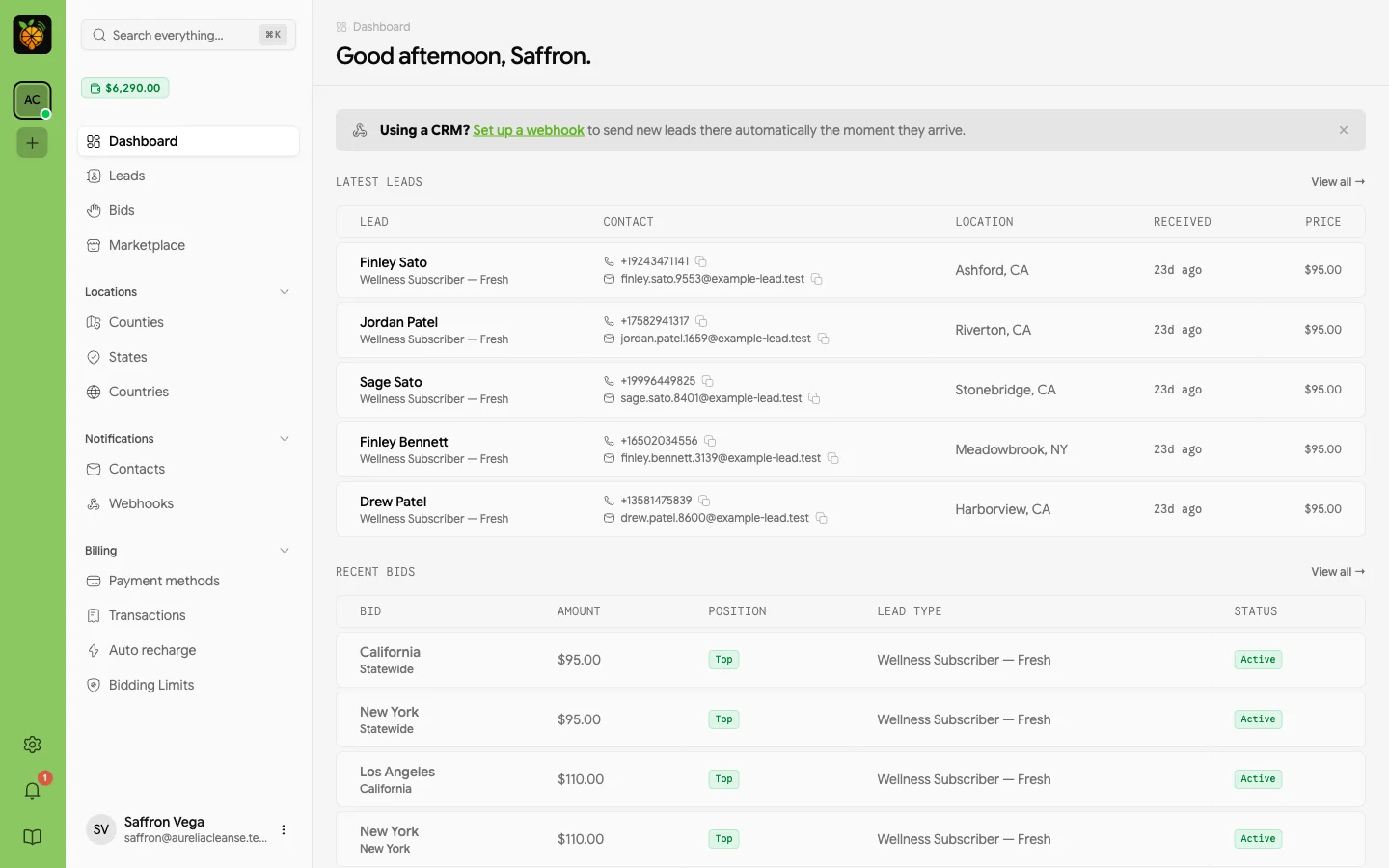
In Juiced, buyers compete in the open. A buyer with no API sets a bid per lead type for a county, a state, or nationwide, sees the current top bid and their position for that location, and gets an alert when outbid. The winner pays one bid step above the next-highest eligible offer, or your minimum when no one else is bidding. Leads that reach a marketplace stage are listed to your buyers at a price that steps down to your floor, and buyers can leave buy orders. If validation integrations, lifecycle logs, or Lead Prosper's managed support decide it for you, weigh those; if you want non-technical buyers competing on price with visible positions, run your own lead types through Juiced.
What to compare in a real evaluation
| Question | Juiced | Lead Prosper |
|---|---|---|
| Who sets the price in the primary auction? | Buyers do. Each buyer sets their own bid in the branded portal per lead type, for a county, a state, or nationwide, within the minimum, maximum, and bid step you set, or you set a fixed price. In a Highest Price stage, portal bids and ping/post partner bids compete in one pool, and the winner pays one bid step above the next-highest eligible offer, or your minimum when unopposed. | Markets direct post and ping/post routing with a Highest Bidder method, which sorts buyers by a price from each buyer profile: a static or conditional price, or the bid an API-integrated ping/post buyer returns on the ping. Operators can let portal buyers set their own campaign default and conditional pricing, and changes may apply automatically or require admin approval.[1][9][2][10] |
| What do buyers see about competing bids? | Each bid shows the current top bid for that location and the buyer's position: top, tied, under, or out. Buyers get outbid and bid-matched notifications and can raise, lower, or pause a bid from the portal. | Portal buyers see their leads, lead-level detail, campaign analytics, and revenue. Its documentation does not describe buyers seeing competing bids, the top bid, or their rank; outbid activity appears in the operator's leads list and lead timeline.[3][11][9] |
| What can buyers manage themselves? | A branded buyer portal with delivered leads, bids by lead type and location, marketplace purchases and buy orders, wallet funding by saved card with auto-recharge, the per-bid and account-wide caps and budgets you choose to expose, pause controls, and notifications. Returns are reviewed and refunded by your team from the operator panel. | Documents a white-label customer portal with Stripe-funded balances and auto-recharge, lead views and exports, and, when the operator permits, per-campaign default and conditional pricing, volume and budget caps, allow and block filters, pause and resume, and return requests. Each change may apply immediately or require admin approval, and the operator creates each portal login.[3][10] |
| What happens to eligible leads that do not sell on the primary route? | Leads that reach a marketplace stage are listed to your buyers at a starting price that steps down by your increment on your interval to a floor. Buyers can buy now or place buy orders with funds held at their target price, and the highest buy order sets the new floor. It runs as a stage in the same distribution flow. | Describes re-routing failed or unsold leads by wiring a Campaign Trigger that posts them into a second campaign with matching fields and keys; delayed triggers can re-send a lead 1 to 90 days later. In a Ping Post Exchange, a lead rejected on post does not roll to the next-highest bidder unless Bid Until Breakeven applies. Its documentation does not describe a marketplace or automatic re-pricing for unsold leads.[4][12][13][5] |
| What evidence is available for a delivery decision? | Distribution records for each lead, duplicate checks, audit rules that hold suspicious leads for review, and operator-run returns with return-rate tiers. | Markets full lead lifecycle visibility: each buyer's API post and response, full ping responses, and campaign trigger logs.[1] |
| How is it priced? | Flat monthly plans from $250 per month, tiered by lead volume and revenue, with no per-lead fees and no setup fees. | Plans start at $500 per month with 5,000 leads and 200,000 pings included, tiered overage, and no contracts; its terms ask for 30 days' written notice to cancel. An Operate plan, from $1,000 per month on top of a Lead Prosper plan, adds a team that builds campaigns and APIs.[6][68] |
Lead Prosper details summarize Lead Prosper's own public materials, linked in the sources below. They are not an independent product test, and a capability missing from this table is not evidence that it is missing from the product.
Where Juiced may fit better
- Your buyers have no API, and you want them to set bids per lead type by county or state, see the current top bid and their position, and react to outbid alerts without contacting you.
- You want unsold eligible leads to move into a step-down marketplace with buyer buy orders, without wiring a second campaign and its API keys.
- You prefer flat monthly pricing without per-lead or per-ping volume charges.
Where Lead Prosper may fit better
- Your evaluation centers on its validation integrations, such as TrustedForm, LeadID, Anura, and Xverify, or on its lead lifecycle analytics.
- Most of your buyers are API-integrated ping/post buyers who return their own bids, and you already run a Lead Prosper direct post and ping/post setup.
- You want paid support tiers with a dedicated account manager, or its Operate plan, where its team builds campaigns and buyer integrations for you.
Questions to bring to both demos
- 1Show a portal buyer changing their own price by state without contacting you, whether the change waits for approval, and what they see about competing bids.
- 2Show how a buyer with no API wins a Highest Bidder auction against ping/post buyers, and what the winner is charged.
- 3Show what happens to a lead that every primary buyer rejects, including how it is priced and who can buy it.
- 4Show how buyer budget, cap, funding, and eligibility affect a live delivery decision, and the record an operator sees afterward.
Frequently asked questions
Is Juiced a LeadProsper alternative?
Yes. Juiced is an alternative to evaluate if you want buyers without an API to set their own bids by lead type and county or state, see the current top bid and their position, and compete in the same auction as your ping/post partners, with unsold eligible leads moving into a step-down marketplace. Lead Prosper publicly emphasizes routing, ping/post delivery, validation integrations, and lifecycle analytics. Compare both against your own lead types and buyer rules.
Can Lead Prosper buyers set their own prices?
Yes, if the operator permits it. Lead Prosper's buyer portal lets permitted buyers set a campaign default price and conditional pricing rules, such as by state, and pricing changes may apply automatically or require admin approval. Its documentation does not describe buyers seeing competing bids or their rank. In Juiced, buyers set bids per lead type for a county, a state, or nationwide and see the current top bid and their position for that location.
Does Juiced support ping/post lead distribution?
Yes. In a Juiced Highest Price stage, ping/post partner bids and portal bids compete in one pool under the same buyer criteria, and each buyer's offer is limited by their wallet balance and remaining budgets. The winner pays one bid step above the next-highest eligible offer, or your minimum when no one else is bidding.
How does the Juiced reverse-auction marketplace work?
A lead that reaches a marketplace stage is listed to your buyers at a starting price you set. The price steps down by your increment on your interval until a buyer purchases it or it reaches your floor. Buyers can buy now or place buy orders at their target price with funds held, and the highest buy order sets the new floor. Which leads are eligible depends on your configuration, buyer agreements, and any consent or resale restrictions.
How does Juiced pricing compare with Lead Prosper pricing?
Juiced uses flat monthly plans from $250 per month, tiered by lead volume and revenue, with no per-lead fees. Lead Prosper's published plans start at $500 per month with 5,000 leads and 200,000 pings included and tiered overage above that. Check both pricing pages for current terms.
Sources
Last updated
- [1]Lead Prosper homepage. Accessed September 23, 2026. (archived)
- [2]Lead Prosper Help Center: Buyer Pricing Explained. Accessed September 24, 2026.
- [3]Lead Prosper Help Center: The Customer and Supplier Portals. Accessed September 24, 2026.
- [4]Lead Prosper Help Center: Link Two Campaigns Together Using Campaign Triggers. Accessed September 24, 2026.
- [5]Lead Prosper: How to Remonetize Failed Leads. Accessed September 23, 2026. (archived)
- [6]Lead Prosper Pricing. Accessed September 24, 2026. (archived)
- [7]Lead Prosper Integration Partners. Accessed September 23, 2026. (archived)
- [8]Lead Prosper Client Support. Accessed September 23, 2026. (archived)
- [9]Lead Prosper Help Center: Highest Bidder Distribution Explained. Accessed September 24, 2026.
- [10]Lead Prosper Help Center: Give Buyers Control Over Pricing, Caps, and Filters. Accessed September 24, 2026.
- [11]Lead Prosper Help Center: Leads List Platform Tour. Accessed September 24, 2026.
- [12]Lead Prosper Help Center: Schedule, Repost, and Delay Leads via Campaign Triggers. Accessed September 24, 2026.
- [13]Lead Prosper Help Center: Why a Rejected Lead Can't Just Go to the Next Highest Bidder in a Ping Post Exchange. Accessed September 24, 2026.
- [14]Lead Prosper Help Center: How to Set Up a Ping Post Exchange in Lead Prosper. Accessed October 6, 2026.
- [15]Lead Prosper Help Center: What is a Bid Penalty When Would you Use it. Accessed October 6, 2026.
- [16]Lead Prosper Help Center: Lead Routing in Lead Prosper Distribution Methods Explained. Accessed October 6, 2026.
- [17]Lead Prosper Help Center: Deep Dive Into Round Robin Weighted Round Robin. Accessed October 6, 2026.
- [18]Lead Prosper Help Center: Filters in Lead Prosper a Complete Guide. Accessed October 6, 2026.
- [19]Lead Prosper Help Center: Filtering Zip Codes by Radius Using API Filters Openais Chatgpt. Accessed October 6, 2026.
- [20]Lead Prosper Help Center: Filtering Leads by Date or Age in Lead Prosper. Accessed October 6, 2026.
- [21]Lead Prosper Help Center: Buyer Groups in Lead Prosper Setup Distribution Logic Use Cases. Accessed October 6, 2026.
- [22]Lead Prosper: Features. Accessed October 6, 2026.
- [23]Lead Prosper Help Center: Understanding the Bid Until Break Even Point Feature in Lead Prosper Ping Post Exchanges. Accessed October 6, 2026.
- [24]Lead Prosper Help Center: Understanding the Lead Modal Lead Processing Troubleshooting Guide. Accessed October 6, 2026.
- [25]Lead Prosper Help Center: How to Edit and Repost Leads in Lead Prosper. Accessed October 6, 2026.
- [26]Lead Prosper Help Center: The Different Levels of Duplicate Checks in Lead Prosper. Accessed October 6, 2026.
- [27]Lead Prosper Help Center: Campaign Fields Explained the Smart Way to Control Data Quality From Ingestion to Delivery Lead Prosper. Accessed October 6, 2026.
- [28]Lead Prosper Help Center: Transform your Data with Payload Field Transformers. Accessed October 6, 2026.
- [29]Lead Prosper Help Center: How to Return Leads in Lead Prosper. Accessed October 6, 2026.
- [30]Lead Prosper: New in Lead Prosper White Label Portals Billing Tools and Automation Upgrades. Accessed October 6, 2026.
- [31]Lead Prosper Help Center: Return Leads Platform Tour. Accessed October 6, 2026.
- [32]Lead Prosper Help Center: Breaking Down the Different Buyer Types in Lead Prosper. Accessed October 6, 2026.
- [33]Lead Prosper Help Center: Adding Team Members to your Lead Prosper Account. Accessed October 6, 2026.
- [34]Lead Prosper Help Center: First Time Set Up Guide for the Customer Portal. Accessed October 6, 2026.
- [35]Lead Prosper Help Center: Give your Suppliers Transparent Lead Reporting with Lead Prospers Supplier Portal. Accessed October 6, 2026.
- [36]Lead Prosper Help Center: How to Set Up a Direct Post Campaign. Accessed October 6, 2026.
- [37]Lead Prosper Help Center: Ping Result Requirement Rules Setting Minimum Bid Prices and Other Conditioins. Accessed October 6, 2026.
- [38]Lead Prosper Help Center: An Overview of Supplier Settings. Accessed October 6, 2026.
- [39]Lead Prosper Help Center: A Complete Guide to Reading and Understanding Lead Prosper Supplier API Specs. Accessed October 6, 2026.
- [40]Lead Prosper Help Center: Dupe Checking Customizing the Supplier API Response in Campaign Settings. Accessed October 6, 2026.
- [41]Lead Prosper Help Center: Understanding Lead Buyer Error Groups. Accessed October 6, 2026.
- [42]Lead Prosper Help Center: API Filters Advanced Lead Flow Filtering for your Campaigns. Accessed October 6, 2026.
- [43]Lead Prosper Help Center: Uploading Leads in a CSV File to Lead Prosper Using Postman. Accessed October 6, 2026.
- [44]Lead Prosper Help Center: Custom Headers in Lead Prosper Buyer Set Ups. Accessed October 6, 2026.
- [45]Lead Prosper Help Center: Using the Upgraded Response Parser to Simplify Buyer Setups. Accessed October 6, 2026.
- [46]Lead Prosper Help Center: Testing Buyers Campaign Triggers and More with Existing Lead Data. Accessed October 6, 2026.
- [47]Lead Prosper Help Center: Lead Prosper Ping Post Buyer Setup Buyer Setup Guides. Accessed October 6, 2026.
- [48]Lead Prosper Help Center: Boberdoo Ping Post Buyer Setup Guide Buyer Setup Guides. Accessed October 6, 2026.
- [49]Lead Prosper Help Center: Using Zapier to Send Leads to your Lead Prosper Campaigns. Accessed October 6, 2026.
- [50]Lead Prosper: Legal Lead Routing and Compliance. Accessed October 6, 2026.
- [51]Lead Prosper Help Center: Customer Buyer Portal Lead Prosper Platform Tour. Accessed October 6, 2026.
- [52]Lead Prosper Help Center: Understanding the New Lead Prosper Analytics. Accessed October 6, 2026.
- [53]Lead Prosper Help Center: Using the Simple Detailed Accounting Reports. Accessed October 6, 2026.
- [54]Lead Prosper Help Center: Understanding Customizing your Lead Prosper Dashboard. Accessed October 6, 2026.
- [55]Lead Prosper Help Center: Breaking Down the Exchange Ping Breakdown Report. Accessed October 6, 2026.
- [56]Lead Prosper Help Center: Monitoring Alerts Lead Prosper Platform Tour. Accessed October 6, 2026.
- [57]Lead Prosper Help Center: How to Search View and Filter your Leads in Lead Prosper. Accessed October 6, 2026.
- [58]Lead Prosper Help Center: Ping and Post Logs Lead Prosper Platform Tour. Accessed October 6, 2026.
- [59]Lead Prosper Help Center: Enabling 2 Factor Authentication for Added Security in your Lead Prosper Account. Accessed October 6, 2026.
- [60]Lead Prosper: Pricing. Accessed October 6, 2026.
- [61]Lead Prosper Help Center: How to Clone a Campaign in Lead Prosper. Accessed October 6, 2026.
- [62]Lead Prosper: Leadprosper vs Others. Accessed October 6, 2026.
- [63]Lead Prosper Help Center homepage. Accessed October 6, 2026.
- [64]Lead Prosper: Schedule Strategy Call. Accessed October 6, 2026.
- [65]Lead Prosper Help Center: Breaking Down Lead Prospers Tiered Pricing. Accessed October 6, 2026.
- [66]Lead Prosper Help Center: Account Settings Overview. Accessed October 6, 2026.
- [67]Capterra: Lead Prosper. Accessed October 6, 2026.
- [68]Lead Prosper: Terms and Conditions. Accessed October 6, 2026.