
Key differences
Feature comparison
| Feature | Juiced | Phonexa |
|---|---|---|
| Buyer bidding | ||
| Buyers set their own bids in the portal | Yes | YesBuyer editors can change campaign price and min accepted bid, if admin permits[10] |
| Different bids by location | YesCounty, state, or nationwide | YesPer-campaign state filters and price, or Dynamic Bidding rules on lead fields[13] |
| Buyers see the top bid and their position | YesTop bid and rank per bid, plus a Counties tab showing top bids across a state | Not found in public materials |
| Outbid alerts to buyers | Yes | YesOutbid notices posted to buyer's server URL, not portal alerts[14] |
| Winner pays one step above the next-highest bid | Yes | Not found in public materials |
| Highest-bid auction routing with live ping/post bids | YesHighest bid wins; partner ping-post bids read live from their response; pings send partial data, the full lead goes to the winner alone | YesPrice, Parallel Pings (Higher Price), and Ping-Post strategies[12][20][21] |
| High-return buyers pushed down the bidding pool | YesReturn Tiers with a grace period for new customers; buyers see their tier in the portal | Not found in public materials |
| Routing & distribution | ||
| Waterfall or priority routing | YesOrdered stages; unsold leads fall through to the next stage; drag-to-order stage pipeline; lead-type priority | YesPrice/Priority strategies cascade to next campaign on reject[12] |
| Round robin or weighted distribution | YesRound Robin stage at a flat price per lead; weighted split not confirmed | Yes'Even Within a Group' strategy distributes evenly; weighted split Weight strategy[12] |
| Per-buyer filters and routing rules | Yes15 operators, unlimited conditions, zip rules, and date-age conditions; portal bids are county-level or wider; no regex or radius | YesProduct-field filters, flexible 'match N of M' filters, allow/block lists; ZIP targeting via Present Lists on ZIP field; radius not confirmed[22][23][24] |
| Customizable lead types | Yes | YesCustom products/verticals via Product Builder; Phonexa builds 6, then $149 each[25] |
| One lead sold to more than one buyer | NoEvery lead is sold exclusively to one buyer | YesExclusive campaigns per publisher; multi-sell via All Sold or Smart Tree; 'All Sold' parallel pings sell a lead to every accepting campaign[26] |
| Delivery schedules and pacing | No | YesDelivery schedules: weekday/date-range schedules with campaign time zone; delayed delivery: silent campaign delay 1 min–3 days; repost delays; out-of-hours queueing not confirmed[27][28] |
| Caps and budgets per buyer | YesCustomer- and bid-level lead caps and dollar budgets; per-bid caps by lead type and location; per-source quotas | YesLead-count caps: daily, weekly, monthly sold caps plus ping/post limits; field-based caps: per-publisher cap lists on each campaign; spend caps not confirmed[29][30] |
| Email, SMS, or file delivery channels | YesLead Assigned email (SendGrid) and SMS (Twilio) plus webhooks, all at once per buyer; no FTP/CSV batch delivery | YesVia SMTP event-tracking rule on Lead Sold; FTP/CSV batch delivery not confirmed[31][32][33][34] |
| Aged lead sales at a lower price | YesReverse auction steps down; aged repost via a later stage | YesSilent campaigns (delay up to 3 days) or Repost Automation (Enterprise) at own price[35] |
| Multi-stage routing | YesOrdered stages, each with its own method; partners compete within a stage, stages run in sequence | YesMain ping tree, then silent and exit-offer trees; parallel pings or sequential price/priority/weight trees[36][12] |
| Failover, retries, and redelivery | YesMoves to the next offer when a partner post fails; webhooks retried 3 times; single or bulk reprocess from a chosen stage, with edits; manual assignment not confirmed | YesMoves to next campaign at no lower price, or Smart substitute; manual assignment not confirmed[20][37][35] |
| Marketplace & unsold leads | ||
| Reverse-auction marketplace for unsold leads | Yes | Not found in public materials |
| Buyers browse and buy unsold leads on demand | YesOptional public browsing without login; listings show just county, type, timing, and price; bulk checkout | Not found in public materials |
| Subscription lead pool | YesClub subscriptions | Not found in public materials |
| Lead quality & returns | ||
| Duplicate detection | YesLookback window, match fields, global or per-source scope, fuzzy options; checked at the ping stage | YesDuplicate detection: up to 10 rules per product; product, campaign, group, or publisher scope; ping-stage dupe check not confirmed[38] |
| Hold suspicious leads for review | Yes | Not found in public materials |
| Custom lead fields with normalization | YesUnlimited custom fields; Alter Data stage normalizes or rewrites values | YesCustom fields: ~11 typed field types with per-product caps, plus flexible extra fields; value normalization not confirmed[25] |
| Lead returns and refunds | YesBuyers request returns in the portal and your team approves each one; reason codes, auto-approval rules, and bulk CSV returns not documented | YesBuyer requests in portal; admin approves; requires Books360; auto-approval rules not confirmed[18][39][40] |
| Calls & lead capture | ||
| Call routing, tracking, and IVR | NoNo call module | YesCall Logic call routing and transfers; simultaneous ring not confirmed[6][41][42][43] |
| Buyer portal & white-label | ||
| Buyer portal with roles and reports | Yes8 portal sections; Customer Admin and User roles; dashboard of leads and bids with CSV export; account switcher | YesBuyer logins with configurable campaign permissions[10][44][45][46] |
| Buyer notifications | Yes14 event types across email, SMS, and in-app, including Under Funded Bids | YesEmail alerts (caps, low balance, timeouts); SMS templates available[47] |
| Buyers manage their own caps, budgets, and pauses | YesDaily, weekly, and monthly caps and budgets you enable; buyers pause themselves | YesBuyer-set caps: daily/total caps and ping/post limits, if admin enables; buyer self-pause not confirmed[10] |
| Buyers manage their own filters and fields | YesBuyers pick lead types and locations per bid, and template their own webhook payload | YesBuyer-managed filters: buyer editors can edit filters, if permitted; buyers choose fields not confirmed[10] |
| Buyers set up their own delivery integrations | Yes | YesIf admin lets buyer editors edit integration/tracking settings[10] |
| Buyer self-signup | YesAlways-on public registration plus invites; terms acceptance at signup (optionally every login); signup attribution on the customer record | YesBuyer self-signup: embeddable buyer registration form; terms acceptance: documents accepted at registration and signed in-app; signup attribution not confirmed[15][48] |
| White-label buyer portal on every plan | Yes | YesPrivate-domain white labeling; plan inclusion not stated[49] |
| Custom domain, colors, and logo | YesCustom domain on $500/mo plans and up; brand and accent colors, logo, dark-mode logo, favicon | YesOwn root domain via Cloudflare (cp., leads. subdomains); logo, favicon, color themes, fonts, login page, dark mode[49][50] |
| In-portal banners and announcements | Yes | YesDashboard messages and header banner; targeting not confirmed[50] |
| Supplier management | ||
| Portal for your lead suppliers | YesDashboard, leads, payout reports, and account; supplier self-pause and exports not confirmed | YesSupplier portal: publisher logins with reports and posting specs; supplier self-pause not confirmed; supplier exports not confirmed[51] |
| Supplier intake by direct post or ping/post | YesPOST /ping returns live bids, or sources post directly; both reach portal bids and ping-post partners | YesPublisher pings, gets summed or per-leg offers, then posts; direct post / full post[20][3][52] |
| Margin and price limits on supplier bids | YesPayout % of the winning bid per source (lead-type overrides) keeps bids below resale value; max bid is per lead type, not per source; supplier reserve price not confirmed | YesDefault earning % with per-publisher rev-share overrides[53][54][17] |
| Supplier payouts, fixed or revenue share | YesFixed price or % of the winning bid per source; returns can be excluded from payout (per-partner toggle); pay-on-sold not confirmed | YesFixed or rev-share payouts: fixed price, static or floating %, min/max; returns charged back: returns can be charged back to the publisher; 'Do Not Pay Publishers for Duplicates'; pay on sold only not confirmed[54][55] |
| Auto-generated supplier posting specs | YesShareable per-source API spec link; outcomes mapped to success, rejected, or duplicate, with field-level errors | YesGenerated posting docs with field specs and code samples; custom publisher responses by event; redirect URLs, reject links, custom publisher responses[56][52][57] |
| Integrations & API | ||
| Documented ping/post API and CSV import | YesOpenAPI spec published; JSON in, JSON or form-encoded out; CSV import goes to the marketplace or Club, not full routing | YesDocumented API: publisher posting API docs with code samples; reporting API keys; multiple formats: JSON, XML, form; GET/POST/PUT/PATCH; bulk CSV import not confirmed[56][52] |
| Outbound webhooks with auth and filtering | Yes9 tenant events with retries; Basic, Bearer, and custom headers (no OAuth); test sends; filtering rules not confirmed | YesEvent Tracking 'Ping URL' rules on 20+ lead/call events[58][59] |
| No-code integration builder | YesPoint-and-click request mapping per partner and per-buyer payloads; response.* merge tokens; one vertical starter template, no buyer templates | YesIntegration builder: Integration Builder value mapping and Twig templating; prebuilt templates: standard (prebuilt) integrations alongside custom ones; ping-response tokens not confirmed[52][60] |
| Zapier, Make, and named CRM connectors | YesNot native; Zapier and CRMs connect through webhooks | YesZapier: not native, uses Webhooks by Zapier to post leads in; CRM connectors: HubSpot, Salesforce, Five9, VICIdial, CallTools, Dialpad listed; Make / Pabbly not confirmed[61][62] |
| Billing & payments | ||
| Prepaid buyer balances with auto-recharge | YesUnfunded buyers' bids drop out of the auction; manual credits and debits | YesPrepay wallet, no-balance skip[16][63][64] |
| Deposit fees and minimum deposit | YesCustomizable deposit fees, waived on the initial deposit; deposit threshold unlocks bidding | YesConfigurable processing-fee % per processor; first-deposit waiver not confirmed; minimum replenishment amount for prepaid buyers[65] |
| Payment processor | Stripe | Stripe, Authorize.Net, or PayPal (prepaid top-ups)[65] |
| Reporting & analytics | ||
| Profit, margin, and accounting reports | YesMargin by partner, revenue by buyer and source; partner payout reports and buyer transaction ledger | YesRevenue, payouts, and profit by publisher, buyer, campaign; admin revenue per lead in reports; Books360 payables and receivables[3][66] |
| Real-time and geographic dashboards | YesReal-time dashboard; country, state, and county Location Analytics with 30-day trends; bid analytics limited to top bid and price range by location; alerts limited to plan usage | YesReal-time reporting and Global Dashboard[3][67][68][69] |
| Custom reports, scheduling, and CSV export | YesCSV export of leads and county analytics; no custom report builder or scheduled reports | YesCustom formula columns and custom publisher reports; scheduled report export by email; CSV export; bulk lead export needs owner approval code[70][71][72] |
| Full lead timeline and raw logs | YesPer-lead distribution timeline; raw inbound and outgoing partner logs; buyer-side delivery history with resend | YesPer-lead processing logs and filter log of campaign statuses; per-ping/post Log popup shows request and response bodies[57][73] |
| Security | ||
| Two-factor authentication and passkeys | YesEmail-code 2FA and passkeys | Yes2FA: Google Authenticator; can be mandatory for buyers/publishers/staff; passkeys not confirmed[74] |
| Platform & admin | ||
| Unlimited campaigns, seats, and brands | YesUnlimited lead types and vendors; seat limit not stated; operator multi-brand not documented | YesUnlimited campaigns: unlimited products, campaigns, publishers, buyers; sub-accounts: Universal Login lists and opens all of a user's instances; unlimited admin seats not confirmed[8][75] |
| Test mode, cloning, and templates | YesSource test mode with deterministic test ZIPs; lead-category templates and pricing copy between sources | YesLeads Test tool, campaign test tab, testMode=1; campaign clone; Lead Deals campaign templates[76][77] |
| Support | ||
| Support channels and plans | YesLive chat, email | YesContact page says available 24/7; tiered plans not confirmed[78][79][8] |
| Public help center and changelog | YesDocs.usejuiced.com, with platform and portal changelogs | YesSupport.phonexa.com knowledge base; in-app System Updates list (not public)[66][80] |
| Pricing, contract & onboarding | ||
| Self-serve signup with no-code setup | YesPublic Register page with published entry price; no-code setup stated outright | YesNo-code setup: UI-based Integration Builder; Phonexa team builds products; no self-serve signup[8][52] |
| Onboarding and migration help | YesComplimentary onboarding call; done-for-you setup and migration help not stated | YesOnboarding call: configuration support and up to 4 training sessions/month; done-for-you setup: managed services: config support, monitoring; team builds products/APIs; migration help not confirmed[8] |
| Multi-country and multi-currency | YesUS and Australia with more added on request; multi-currency not confirmed | YesMulti-country: offices in US, UK, Canada; international call campaigns; multi-currency not confirmed[81] |
| Free tier, trial, or money-back terms | Partial7-day free trial; no free tier or money-back terms | Not found in public materials |
| Month-to-month contract terms | YesMonthly, cancel anytime from your account, effective at the end of the paid term; no annual discount; data and settings stored if paused | Not found in public materials |
| Starting price | $250/moFlat, tiered by lead volume and revenue | Custom quote (archived Jan 2025 pricing showed plans from $250/mo)[8] |
| Setup fee | None | Not found in public materials |
| Per-lead or usage fees | None | Volume varies by package; extra products/APIs $149 each; AI agents $0.225/min[8] |
- Offered
- Offered in a limited form
- Costs extra
- Not offered
- Not found in public materials
Phonexa marks summarize Phonexa's own public materials, linked in the sources below. A question mark means we did not find the feature there, not that Phonexa lacks it.
Is Juiced a Phonexa alternative?
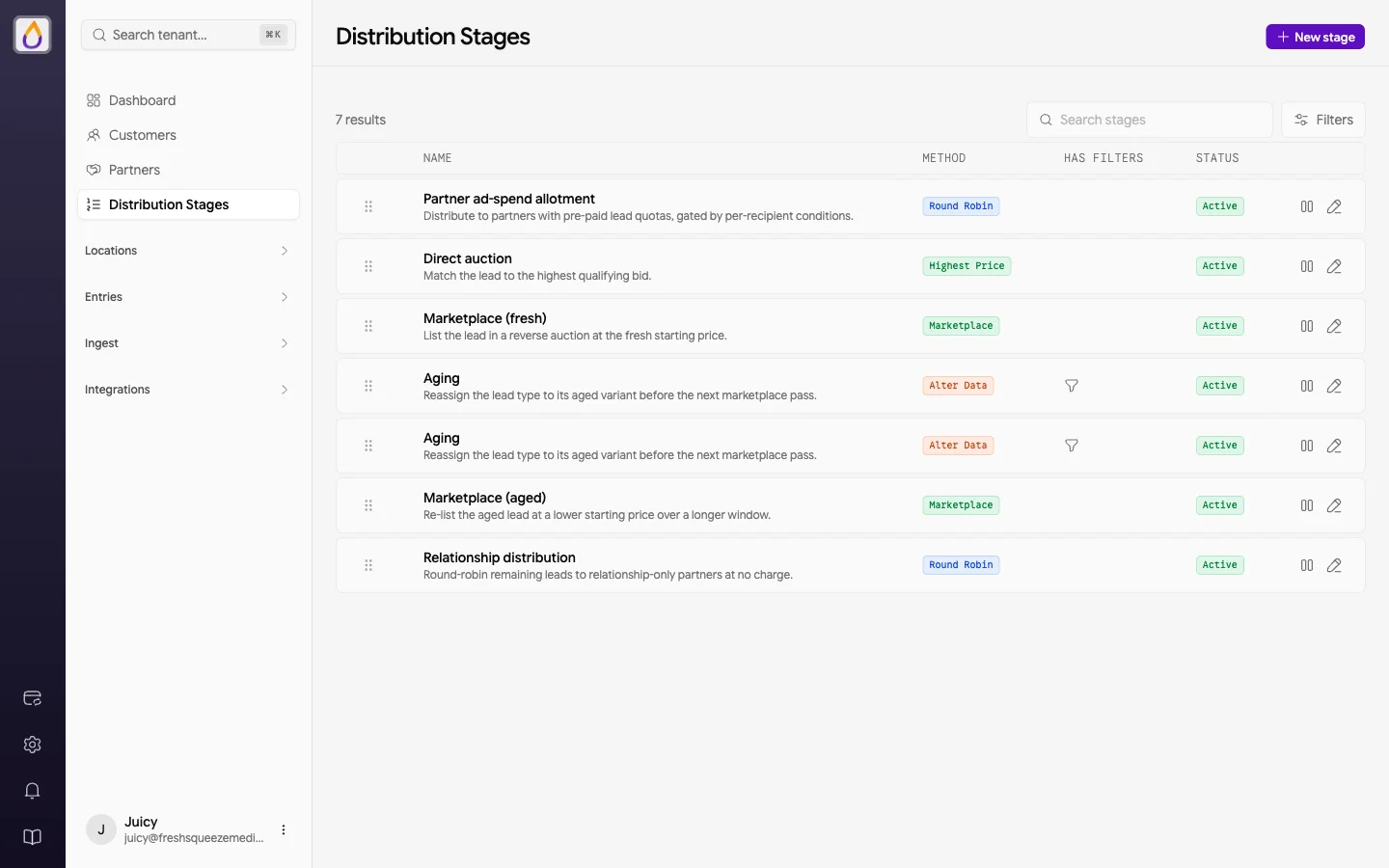
For lead distribution, yes. For pay-per-call, no. Juiced is lead distribution software: it routes web leads through distribution stages to your buyers and does not track, route, or sell phone calls. Phonexa's homepage positions it as enterprise-grade pay-per-call software and describes an integrated pay-per-call and pay-per-lead platform for buyers, publishers, and affiliate networks. Its LMS Sync product covers lead validation and ping trees, while Call Logic, E-Delivery email and SMS, Cloud PBX, Lynx click tracking, and Books360 accounting cover other parts of the performance-marketing stack. Phonexa may fit better when calls are a core revenue channel, when your buyers are technical and return a price on each ping, or when you want leads, calls, email and SMS, and accounting from one vendor.
On buyer pricing the two are closer than they look, so it helps to be specific. In Phonexa, an admin can let a buyer edit their own campaign's minimum price, minimum accepted bid, bid modifiers, filters, and caps, and buyers can self-register and top up a prepaid balance by card when the prepaid option and Books360 are enabled. Its default Price ping tree is a waterfall of campaign prices, and live prices come from buyer systems that answer a ping. Its documentation does not describe buyers seeing competing bids or their rank. In Juiced, buyers bid by lead type at county, state, or nationwide scope from your bid ladder, see the current top bid and their position for that location, and the winner pays one bid step above the next-highest eligible offer, or the minimum when unopposed. Eligible leads that do not sell can go to a marketplace where the price steps down to your floor and buyers can place buy orders.
What to compare in a real evaluation
| Question | Juiced | Phonexa |
|---|---|---|
| What is the core operating scope? | Lead distribution for web leads: buyer bidding by lead type and location, distribution stages, a step-down marketplace for unsold eligible leads, delivery controls, and reporting. No call products. | Markets an integrated pay-per-call and pay-per-lead suite: LMS Sync for leads and Call Logic for calls, plus email and SMS marketing, a cloud phone system, click tracking, suppression list management, and automated accounting.[1][2] |
| Who sets the price, and how does a lead find a buyer? | Buyers set their own bids in the portal from your bid ladder (minimum, maximum, and step per lead type and scope), or you set a fixed price. Portal bids and ping/post bids compete in one Highest Price pool, and the winner pays one bid step above the next-highest eligible offer, or the minimum when unopposed. Round-robin stages at fixed prices you set are also available. | The default Price ping tree is a waterfall ordered by each campaign's minimum price, which Phonexa describes as routing without real-time bidding. Parallel ping and ping post take live prices from buyer systems that answer a ping, and on-demand Dynamic Bidding applies operator-set percentage modifiers to a base price for buyers who cannot return a price by API. Priority, weight, and even flows, iClear screening, bid multipliers, and buyer caps are also marketed.[5][12][13][3][4] |
| Can buyers change their own price, and what do they see? | Yes, bidding is the core buyer workflow. Buyers change bids per lead type at county, state, or nationwide scope, see the current top bid and their position (top, tied, under, or out) for that location, and get outbid and bid-matched notifications. They can pause bids and set the caps and budgets you choose to expose. | Yes, if an admin enables it. Buyer access permissions let buyer users change their campaign's minimum price and minimum accepted bid (optionally limited to increases), edit bid modifiers, filters, schedules, and caps, and unpause campaigns. Its documentation does not describe buyers seeing competing bids or their rank, and outbid notices are sent to a buyer's server URL.[10][14] |
| How do buyers sign up and fund their accounts? | Buyers fund a wallet with a saved card and auto-recharge, and each offer is limited by the buyer's wallet balance and remaining budgets. Buyers can self-register if you enable it. | Operators can embed a buyer registration form, and the prepaid buyer option lets buyers add funds through a Stripe checkout and receive traffic while their balance is positive. Prepaid is enabled on request and requires Books360, which also holds auto-charge and return settings.[15][16][9] |
| What happens to leads no buyer takes, and to returns? | Eligible leads can be listed to your buyers at a starting price that steps down on your interval to a floor. Buyers buy now or place buy orders at their target price, with funds held. Returns are reviewed and refunded by your team from the operator panel. | Rejected leads fall to the next campaign in the tree, to exit pages, or to silent campaigns that re-process leads after the regular flow, with delays of up to three days at a fixed minimum price. Its documentation does not describe an automatic price step-down or a buyer-facing marketplace. Buyers can request a return in the UI for an admin to approve or reject, within a return window you set.[5][17][18][19] |
| Are calls part of the requirement? | Juiced focuses on lead distribution. Assess call tracking, call routing, and pay-per-call requirements separately. | Call Logic markets call tracking with DNI and toll-free and vanity numbers, IVR, AI call agents, and pay-per-call routing with price, priority, weight, Max EPL, and Profit Maker flows.[6][7] |
| How is it priced? | Flat monthly plans from $250 per month, tiered by lead volume and revenue, with no per-lead fees and no setup fees. | Offers custom quotes rather than a public price list; its pricing page says ping, post, and call-minute volumes vary by package, lists managed services as included, and prices additional product and API builds by its team at $149 each. An archived January 2025 version of the page listed packages from $250 per month with setup fees from $500 and per-ping and per-post fees.[8][11] |
Phonexa details summarize Phonexa's own public materials, linked in the sources below. They are not an independent product test, and a capability missing from this table is not evidence that it is missing from the product.
Where Juiced may fit better
- Your buyers are local businesses that will not build an integration, and you want them setting their own price for each lead type and county or state from one bid screen, with the top bid and their position in view.
- You want the winning buyer to pay one bid step above the next-highest eligible offer, or the minimum when unopposed, with portal bids and ping/post bids in one pool.
- You want unsold eligible leads listed to your buyers at a price that steps down to a floor you set, with buyer buy orders, and published flat monthly pricing.
Where Phonexa may fit better
- Calls are a core revenue channel and you need call tracking, IVR, and pay-per-call routing alongside lead distribution from one vendor.
- Your buyers are mostly technical and return a price on each ping, or you want permissioned buyer editing inside the same system you use to run ping trees.
- You want its wider suite, such as email and SMS marketing, click tracking, suppression list management, or Books360 accounting, or its included managed services model.
Questions to bring to both demos
- 1Show a buyer changing their own price for one state without a new campaign or operator help, and show what they see about competing bids and their rank.
- 2Show one lead's full path through a ping tree, including a rejection, the fallback or silent campaign, and the price the winning buyer paid compared with the next offer.
- 3Which features in the quote are on demand or need another module, such as prepaid buyers, Books360, Dynamic Bidding, or Smart Tree?
- 4If calls matter, run call tracking and routing as a separate requirements review with technical and compliance owners present.
Frequently asked questions
Is Juiced a Phonexa alternative?
For lead distribution, yes. Juiced focuses on web leads: buyers bid by lead type and county or state in a branded portal, see the top bid and their position for that location, and unsold eligible leads can go to a step-down marketplace. Phonexa publicly positions itself as a pay-per-call and pay-per-lead suite with separate products for leads, calls, email and SMS, and accounting. Juiced does not replace Phonexa's call products.
Can buyers set their own prices in Phonexa?
Yes, if an admin enables it. Phonexa's knowledge base documents buyer permissions to change a campaign's minimum price and minimum accepted bid, edit bid modifiers, filters, and caps, and unpause campaigns. Its documentation does not describe buyers seeing competing bids or their rank. In Juiced, buyers set bids per lead type and location, see the current top bid and their position, and the winner pays one bid step above the next-highest eligible offer, or the minimum when unopposed.
What are the alternatives to Phonexa?
It depends on which part of Phonexa you would replace. For lead distribution and ping trees, teams commonly compare Juiced, boberdoo, LeadsPedia, Lead Prosper, and LeadExec. For pay-per-call and call tracking, dedicated platforms such as Ringba, Retreaver, and TrackDrive are the usual comparison. Many operators pair a lead distribution platform with a separate call platform.
Does Juiced include call tracking or pay-per-call routing?
No. Juiced focuses on lead distribution and does not include call tracking, call routing, or pay-per-call. If calls are part of your business, assess call requirements separately.
How much does Phonexa cost?
Phonexa does not publish a price list today. Its pricing page offers custom quotes, says ping, post, and call-minute volumes vary by package, and lists managed services as included; an archived January 2025 version listed packages from $250 per month plus setup and per-ping and per-post fees. Juiced publishes flat monthly plans from $250 per month, tiered by lead volume and revenue, with no per-lead fees and no setup fees.
Sources
Last updated
- [1]Phonexa homepage. Accessed September 23, 2026. (archived)
- [2]Phonexa: Marketing Tools and Features. Accessed September 23, 2026. (archived)
- [3]Phonexa: LMS Sync Lead Management System. Accessed September 23, 2026. (archived)
- [4]Phonexa: Lead Distribution Software. Accessed September 23, 2026. (archived)
- [5]Phonexa: Ping Tree Software. Accessed September 23, 2026.
- [6]Phonexa: Call Logic. Accessed September 23, 2026. (archived)
- [7]Phonexa: Pay Per Call Software. Accessed September 23, 2026. (archived)
- [8]Phonexa: Pricing. Accessed September 23, 2026. (archived)
- [9]Phonexa Knowledge Base: Buyer Configuration: Accounting Settings. Accessed September 23, 2026. (archived)
- [10]Phonexa Knowledge Base: Buyer Access Configuration. Accessed September 23, 2026. (archived)
- [11]Phonexa: Pricing (archived January 2025). Accessed September 24, 2026.
- [12]Phonexa Knowledge Base: Ping Tree Settings. Accessed September 24, 2026.
- [13]Phonexa Knowledge Base: Dynamic Bidding Campaigns. Accessed September 24, 2026.
- [14]Phonexa Knowledge Base: Outbid Post. Accessed September 24, 2026.
- [15]Phonexa Knowledge Base: Registration Page for Buyers. Accessed September 24, 2026.
- [16]Phonexa Knowledge Base: Prepaid Buyer Option. Accessed September 24, 2026.
- [17]Phonexa Knowledge Base: Silent Campaigns. Accessed September 24, 2026.
- [18]Phonexa Knowledge Base: Lead Return Option. Accessed September 24, 2026.
- [19]Phonexa Knowledge Base: How to Return Leads. Accessed September 23, 2026.
- [20]Phonexa Support: Ping Post Products Regular and Smart. Accessed October 6, 2026.
- [21]Phonexa Support: Dynamic Price Label. Accessed October 6, 2026.
- [22]Phonexa Support: Campaign Configuration Flexible Filters. Accessed October 6, 2026.
- [23]Phonexa Support: Present Do Not Present Lists. Accessed October 6, 2026.
- [24]Phonexa Support: Fraud and Anomaly Iclear. Accessed October 6, 2026.
- [25]Phonexa Support: Product Builder. Accessed October 6, 2026.
- [26]Phonexa Support: Publisher Configuration Exclusive Campaigns. Accessed October 6, 2026.
- [27]Phonexa Support: Campaign Configuration Schedule. Accessed October 6, 2026.
- [28]Phonexa Support: Campaign Configuration Global Settings Lms. Accessed October 6, 2026.
- [29]Phonexa Support: Additional Caps. Accessed October 6, 2026.
- [30]Phonexa Support: Campaign Configuration Filter by Pubs. Accessed October 6, 2026.
- [31]Phonexa Support: Event Tracking Type Smtp. Accessed October 6, 2026.
- [32]Phonexa Support: Event Tracking Type Twilio. Accessed October 6, 2026.
- [33]Phonexa Support: Campaigns Exports. Accessed October 6, 2026.
- [34]Phonexa Support: Call Logic. Accessed October 6, 2026.
- [35]Phonexa Support: Repost Automation. Accessed October 6, 2026.
- [36]Phonexa Support: Ping Tree Distribution. Accessed October 6, 2026.
- [37]Phonexa Support: Call Transfer Additional Information. Accessed October 6, 2026.
- [38]Phonexa Support: Deduplication Rules. Accessed October 6, 2026.
- [39]Phonexa Support: Lead Return Time Limit. Accessed October 6, 2026.
- [40]Phonexa Support: Import Tasks. Accessed October 6, 2026.
- [41]Phonexa Support: How to Set Up the Call Recording. Accessed October 6, 2026.
- [42]Phonexa Support: The IVR Blocks. Accessed October 6, 2026.
- [43]Phonexa Support: Keyword Analytics. Accessed October 6, 2026.
- [44]Phonexa Support: Lmscall Logic System Roles Permissions. Accessed October 6, 2026.
- [45]Phonexa Support: Buyer Configuration Users. Accessed October 6, 2026.
- [46]Phonexa Support: Buyer Report Lead Details. Accessed October 6, 2026.
- [47]Phonexa Support: Buyer Setup Default Notifications Tab Lms. Accessed October 6, 2026.
- [48]Phonexa Support: Registration Page for Publishers. Accessed October 6, 2026.
- [49]Phonexa Support: White Label. Accessed October 6, 2026.
- [50]Phonexa Support: Appearance Customization. Accessed October 6, 2026.
- [51]Phonexa Support: Publisher Reports Lead Details. Accessed October 6, 2026.
- [52]Phonexa Support: Integration Builder. Accessed October 6, 2026.
- [53]Phonexa Support: Project Settings Lms Call Logic Publisher Settings. Accessed October 6, 2026.
- [55]Phonexa Support: Partial Returns. Accessed October 6, 2026.
- [56]Phonexa Support: Publisher Products API. Accessed October 6, 2026.
- [57]Phonexa Support: Buyer Lead Details Buyer Filter Log Statuses. Accessed October 6, 2026.
- [58]Phonexa Support: Event Tracking Type Ping URL. Accessed October 6, 2026.
- [59]Phonexa Support: Tracking Log. Accessed October 6, 2026.
- [60]Phonexa Support: Integration Access Configuration. Accessed October 6, 2026.
- [61]Phonexa Support: How to Post Leads From Zapier to Phonexa. Accessed October 6, 2026.
- [62]Phonexa: Integrations. Accessed October 6, 2026.
- [63]Phonexa Support: Client Management Balance. Accessed October 6, 2026.
- [64]Phonexa Support: Buyer Configuration Billing Activity. Accessed October 6, 2026.
- [65]Phonexa Support: Project Settings Lms Call Logic Buyer Settings. Accessed October 6, 2026.
- [66]Phonexa Support homepage. Accessed October 6, 2026.
- [67]Phonexa Support: Global Dashboard. Accessed October 6, 2026.
- [68]Phonexa Support: Ping Post Bid Report. Accessed October 6, 2026.
- [69]Phonexa Support: Fraud and Anomaly Fraud Notifications. Accessed October 6, 2026.
- [70]Phonexa Support: Custom Columns for Reports. Accessed October 6, 2026.
- [71]Phonexa Support: Scheduled Report Export. Accessed October 6, 2026.
- [72]Phonexa Support: Lead Export. Accessed October 6, 2026.
- [73]Phonexa Support: Smart Tree with Multi Leg Integration. Accessed October 6, 2026.
- [74]Phonexa Support: Mandatory Two Factor Authentication. Accessed October 6, 2026.
- [75]Phonexa Support: Universal Login. Accessed October 6, 2026.
- [76]Phonexa Support: Leads Test. Accessed October 6, 2026.
- [77]Phonexa Support: Lead Deals. Accessed October 6, 2026.
- [78]Phonexa: Contact Us. Accessed October 6, 2026.
- [79]Phonexa Support: How to Use the Phonexa Support Chatbox. Accessed October 6, 2026.
- [80]Phonexa Support: System Updates. Accessed October 6, 2026.
- [81]Phonexa: About US. Accessed October 6, 2026.